












































































































































































































































































































































































































































































Web Fundamentals
A client makes HTTP requests to obtain information, the server has to respond to those requests, with HTTP responses to give the client information.
HTTP Requests
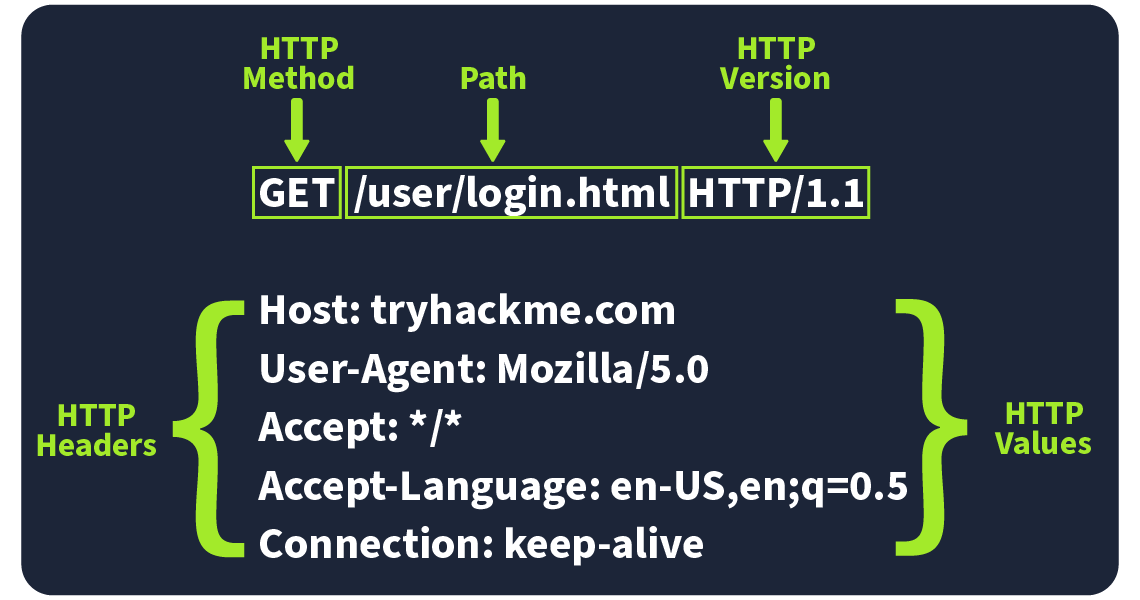
A request for the word-map.png image

Common Request Headers
| Request Header | Example | Description |
|---|---|---|
| Host | Host: tryhackme.com |
Specifies the name of the web server the request is for. |
| User-Agent | User-Agent: Mozilla/5.0 |
Shares information about the web browser the request is coming from. |
| Referer | Referer: https://www.google.com/ |
Indicates the URL from which the request came from. |
| Cookie | Cookie: user_type=student; room=introtowebapplication; room_status=in_progress |
Information the web server previously asked the web browser to store is held in cookies. |
| Content-Type | Content-Type: application/json |
Describes what type or format of data is in the request. |
| ## Request Body | ||
| URL Encoded (application/x-www-form-urlencoded) | ||
A format where data is structured in pairs of key and value where (key=value). Multiple pairs are separated by an (&) symbol, such as key1=value1&key2=value2. Special characters are percent-encoded. |
||
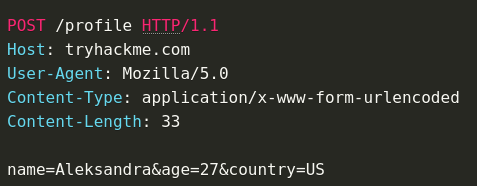 |
Form Data (multipart/form-data)
Allows multiple data blocks to be sent where each block is separated by a boundary string. The boundary string is the defined header of the request itself. This type of formatting can be used to send binary data, such as when uploading files or images to a web server.
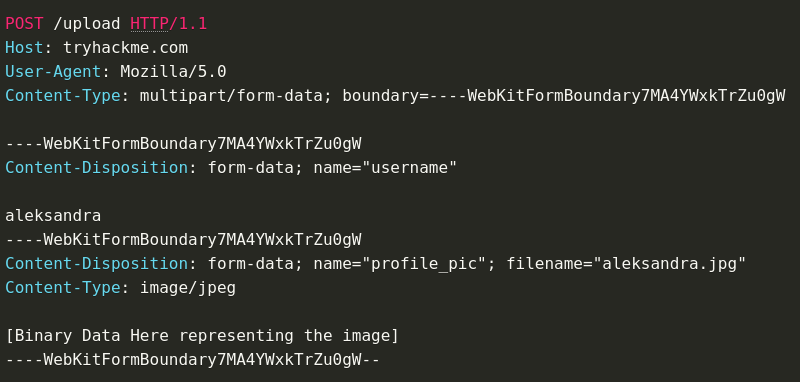
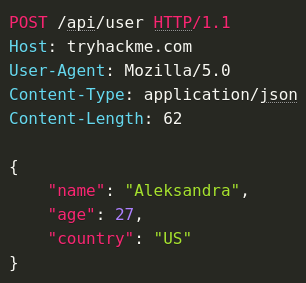
JSON (application/json)
In this format, the data can be sent using the JSON (JavaScript Object Notation) structure. Data is formatted in pairs of name : value. Multiple pairs are separated by commas, all contained within curly braces { }.
XML (application/xml)
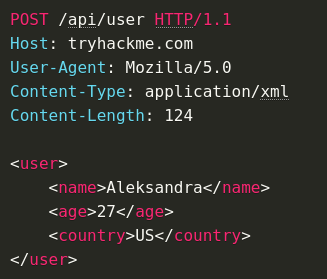
In XML formatting, data is structured inside labels called tags, which have an opening and closing. These labels can be nested within each other. You can see in the example below the opening and closing of the tags to send details about a user called Aleksandra.
Status Codes and Reason Phrases
The Status Code is the number that tells you if the request succeeded or failed, while the Reason Phrase explains what happened. These codes fall into five main categories:
Informational Responses (100-199)
These codes mean the server has received part of the request and is waiting for the rest. It’s a "keep going" signal.
Successful Responses (200-299)
These codes mean everything worked as expected. The server processed the request and sent back the requested data.
Redirection Messages (300-399)
These codes tell you that the resource you requested has moved to a different location, usually providing the new URL.
Client Error Responses (400-499)
These codes indicate a problem with the request. Maybe the URL is wrong, or you’re missing some required info, like authentication.
Server Error Responses (500-599)
These codes mean the server encountered an error while trying to fulfil the request. These are usually server-side issues and not the client’s fault.
PHP
If it's not a POST request, it's just printing HTML
- Client prepares http request
- Goes to web server
- Web server is connected to PHP
- PHP gets the request and processes it
- Generates some HTML
- HTML in HTTP response is sent back to the client
If it's a POST request, it's probably requesting some kind of functionality.
Tags
Note that some tags don't close
- Self-closing tags are typically used for elements that represent a single, atomic piece of content (e.g., an image or a line break).
- Optional closing tags are often used for elements that can contain other elements or text, but do not need to be explicitly closed (e.g., a paragraph or a heading).

Cookies and Web Tokens
The HTTP protocol is stateless, it doesn't know who is connecting or if they've connected before or anything. It has to begin from scratch and has no past recollection. If we want to log in we need to implement the concept of a state to save any information. This is where we use cookies or web tokens.
Something like Authorization Bypass, allowing for viewing of another users' admin panel or something like that.
Cookie structure usually includes a base64 encoded string that when decoded, shows it's respective user


JavaScript and the DOM
DOM is the Document Object Model
HTML document gives structure to the information on the page, this information is read by the browser and it constructs a DOM (Document Object Model) which is a tree (various nodes). This DOM never changes, it's completely static.
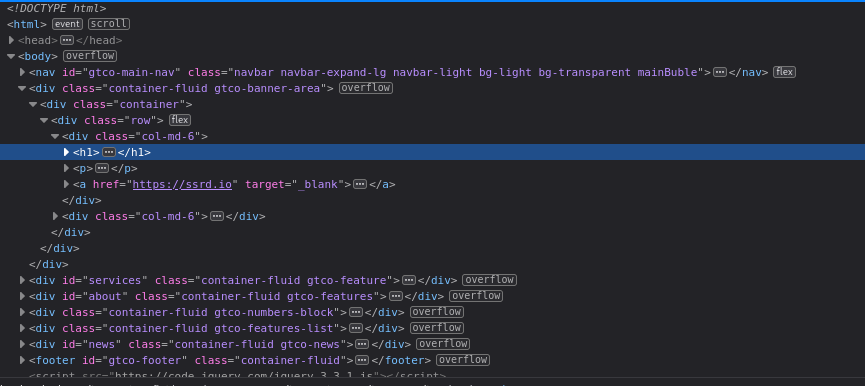
JavaScript was born as a language to interact with the DOM and change the structure of the HTML dynamically.
CSS Stylesheets
CSS (Cascading Style Sheets) is a styling language used to control the layout and visual appearance of web pages. A CSS stylesheet is a file that contains a set of rules, called styles, that are applied to HTML elements to define their appearance.
What is a Web Server?
Essentially a web server exists to give out files; from the web client to the web application.
The web server stores the HTML files, the web application handles the logic contained in the HTTP request and response.
An example of this is authentication, putting exclusive HTML pages behind a login screen requires a web application
Web clients (browsers) are more likely to expose vulnerabilities, web servers tend to be open-source and very secure. This would only change if somebody had made their own bespoke web server.
Dynamicism
- Client-side (thanks to JS)
- Server-side (thanks to web apps)
Apache Tomcat
Tomcat is made up of 3 main components
- Catalina - (backend), container of srvlet Java. implements Jave Servlets and Javaserver pages
- Coyote - HTTP connector of Tomcat. Supports the HTTP 1.1 protocol. It listens on a TCP port and communicates with the tomcat engine to process the request and send the response back to the client.
- Jasper - Compilation unit for JSP pages. Compiles the pages and sends them to CATALINA
- Tomcat - Relays with the java environment that you have on the local system. This is done by checking an env variable named JAVA_HOME. Another way is TOMCAT_HOME which defines where you put tomcat in the local system.
HTTP Response Headers
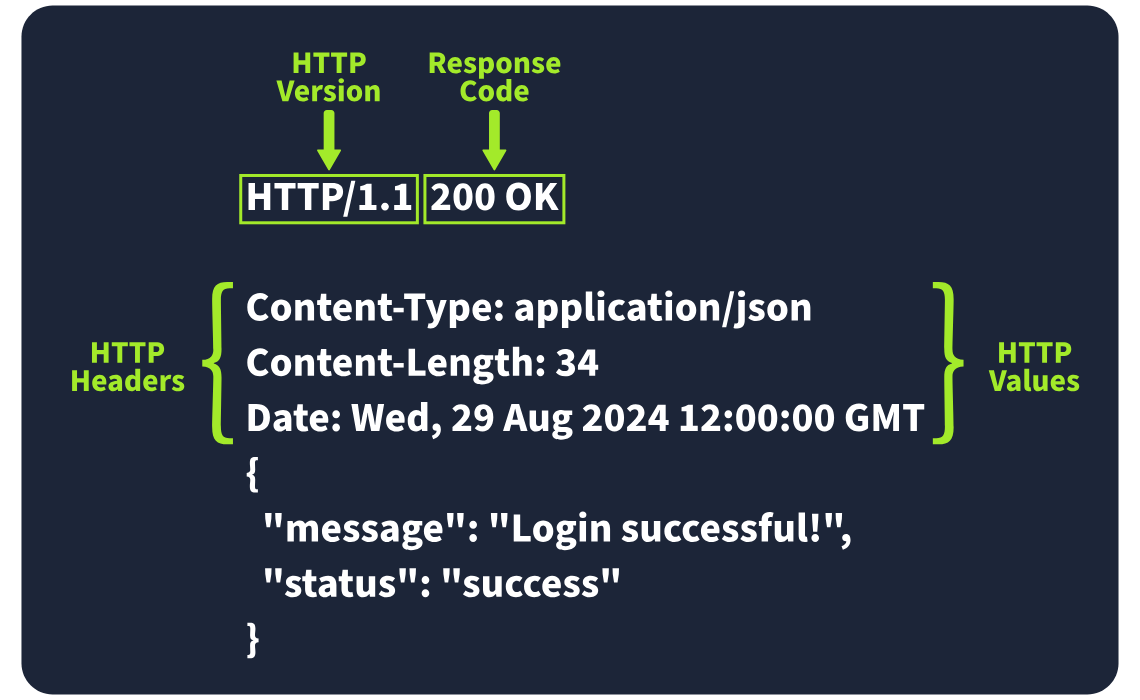
Required Response Headers
Date:
Example: Date: Fri, 23 Aug 2024 10:43:21 GMT
This header shows the exact date and time when the response was generated by the server.
Content-Type:
Example: Content-Type: text/html; charset=utf-8
It tells the client what kind of content it’s getting, like whether it’s HTML, JSON, or something else. It also includes the character set (like UTF-8) to help the browser display it properly.
Server:
Example: Server: nginx
This header shows what kind of server software is handling the request. It’s good for debugging, but it can also reveal server information that might be useful for attackers, so many people remove or obscure this one.
Other Common Response Headers
Set-Cookie:
Example: Set-Cookie: sessionId=38af1337es7a8
This one sends cookies from the server to the client, which the client then stores and sends back with future requests. To keep things secure, make sure cookies are set with the HttpOnly flag (so they can’t be accessed by JavaScript) and the Secure flag (so they’re only sent over HTTPS).
Cache-Control:
Example: Cache-Control: max-age=600
This header tells the client how long it can cache the response before checking with the server again. It can also prevent sensitive info from being cached if needed (using no-cache).
Location:
Example: Location: /index.html
This one’s used in redirection (3xx) responses. It tells the client where to go next if the resource has moved. If users can modify this header during requests, be careful to validate and sanitise it—otherwise, you could end up with open redirect vulnerabilities, where attackers can redirect users to harmful sites.
Response Body
The HTTP response body is where the actual data lives—things like HTML, JSON, images, etc., that the server sends back to the client. To prevent injection attacks like Cross-Site Scripting (XSS), always sanitise and escape any data (especially user-generated content) before including it in the response.
Security Headers
Content-Security-Policy (CSP)
A CSP header is an additional security layer that can help mitigate against common attacks like Cross-Site Scripting (XSS). Malicious code could be hosted on a separate website or domain and injected into the vulnerable website. A CSP provides a way for administrators to say what domains or sources are considered safe and provides a layer of mitigation to such attacks.
Content-Security-Policy: default-src 'self'; script-src 'self' https://cdn.tryhackme.com; style-src 'self'
- default-src
- which specifies the default policy of self, which means only the current website.
- script-src
- which specifics the policy for where scripts can be loaded from, which is self along with scripts hosted on
https://cdn.tryhackme.com
- which specifics the policy for where scripts can be loaded from, which is self along with scripts hosted on
- style-src
- which specifies the policy for where style CSS style sheets can be loaded from the current website (self)
Strict-Transport-Security (HSTS)
The HSTS header ensures that web browsers will always connect over HTTPS. Let's look at an example of HSTS:
Strict-Transport-Security: max-age=63072000; includeSubDomains; preload
- max-age
- This is the expiry time in seconds for this setting
- includeSubDomains
- An optional setting that instructs the browser to also apply this setting to all subdomains.
- **preload
- This optional setting allows the website to be included in preload lists. Browsers can use preload lists to enforce HSTS before even having their first visit to a website.
X-Content-Type-Options
The X-Content-Type-Options header can be used to instruct browsers not to guess the MIME time of a resource but only use the Content-Type header.
X-Content-Type-Options: nosniff
- nosniff
- This directive instructs the browser not to sniff or guess the MIME type.
Referrer-Policy
This header controls the amount of information sent to the destination web server when a user is redirected from the source web server, such as when they click a hyperlink. The header is available to allow a web administrator to control what information is shared. Here are some examples of Referrer-Policy:
Referrer-Policy: no-referrerReferrer-Policy: same-originReferrer-Policy: strict-origin-
Referrer-Policy: strict-origin-when-cross-origin -
no-referrer
- This completely disables any information being sent about the referrer
- same-origin
- This policy will only send referrer information when the destination is part of the same origin. This is helpful when you want referrer information passed when hyperlinks are within the same website but not outside to external websites.
- strict-origin
- This policy only sends the referrer as the origin when the protocol stays the same. So, a referrer is sent when an HTTPS connection goes to another HTTPS connection.
- strict-origin-when-cross-origin
- This is similar to strict-origin except for same-origin requests, where it sends the full URL path in the origin header.